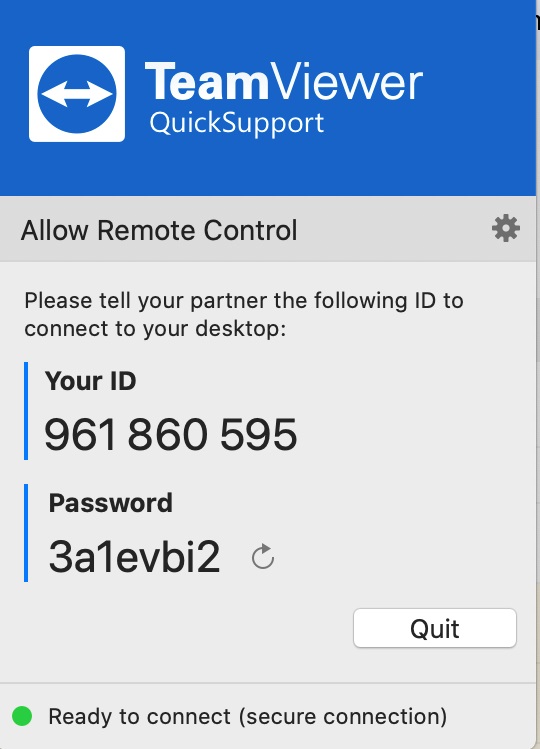
TeamViewer QuickSupport is the small, executable file designed specifically for ad-hoc, one-time remote access. It is built for speed and simplicity, allowing a technician to connect to a user’s device in seconds without requiring any complex installation or configuration from the person needing help. It is the go-to tool for IT help desks everywhere.
Core Strength: The Zero-Install Experience 💨
The power of QuickSupport lies in what it doesn’t require the end-user to do. It’s designed to minimize friction when someone is already stressed about a technical problem.
- No Installation Needed: The file is an executable (or a lightweight app on mobile) that runs instantly when clicked. It doesn’t write files to the system, modify registry settings, or require administrator rights to install. This is the fastest way to get a support session started.
- Unique, Temporary Credentials: When opened, QuickSupport generates a temporary, random 9-digit ID and a 4-digit password. This is crucial for security, as the user only shares these temporary credentials, and the session is immediately terminated when the file is closed. 🔒
- Built-in Trust: Because the user has to verbally or textually share the ID and password, the session always begins with the user’s explicit permission. There is no “unattended access” capability, ensuring the user is always in control.
Key Use Cases and Features 🛠️
QuickSupport is the preferred method for any scenario where the user needs immediate, non-recurring assistance.
1. Help Desk and Customer Support
This is the primary use case. Whether the technician is diagnosing a software bug, fixing a driver issue, or showing a customer how to navigate an application, QuickSupport allows them to jump straight into the remote session with minimal delay. It cuts down call times and frustration.
2. File Transfer and Chat
Even without taking control of the mouse, the technician can use QuickSupport’s integrated features to chat with the user and initiate secure file transfers. This is perfect for sending a necessary driver or a quick patch. 📂
3. Cross-Platform Speed
The QuickSupport app is available across Windows, Mac, and mobile platforms (iOS and Android). This allows a technician to provide assistance to a user’s desktop, laptop, or smartphone all using the same simple connection method. 💻📱
Limitations (Why It’s Not the Host)
QuickSupport serves a very specific purpose and is intentionally limited compared to the full TeamViewer client or the Host app:
- No Unattended Access: If the user logs out or reboots the computer, the session is over, and the temporary ID and password are invalidated. It cannot be used for maintenance that happens overnight or without the user present.
- Basic Feature Set: It lacks advanced administrative features like central management, remote device grouping, or detailed policy deployment. It is purely an access tool.
Final Verdict
TeamViewer QuickSupport is an essential utility for efficiency in remote support. It is expertly engineered for speed, security, and ease of use, making the connection process as painless as possible for the person needing help. It’s the perfect software solution for any organization that prioritizes fast, single-session troubleshooting. 👍