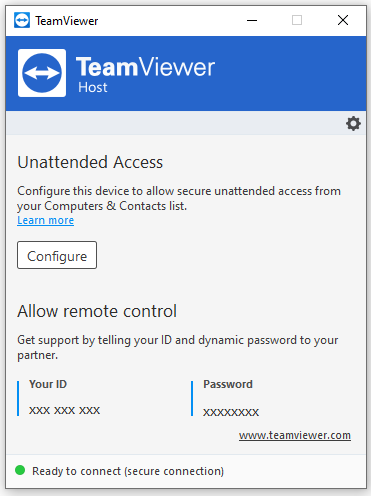
TeamViewer Host is a specialized component of the TeamViewer ecosystem, designed specifically for unattended access to remote computers. Unlike the full TeamViewer application, which allows for both outgoing and incoming connections, TeamViewer Host is installed on a machine that needs to be consistently accessible for remote control, support, or management, without requiring a person to be present at the remote end to accept the connection.
Purpose and Overview
The primary purpose of TeamViewer Host is to enable permanent, always-on access to a remote device. This makes it an invaluable tool for IT administrators managing servers or client workstations, businesses providing remote support, or individuals needing to access their home or office computer from anywhere at any time. It ensures that the remote machine is ready to receive connections whenever needed, making remote management highly efficient and reliable.
Key Features
- Unattended Access:
- This is the core feature. Once installed, TeamViewer Host runs as a system service, allowing connections to be established even if no user is logged in or if the computer is restarted.
- It’s ideal for servers, remote workstations, or any device that requires continuous remote availability.
- Permanent ID and Password:
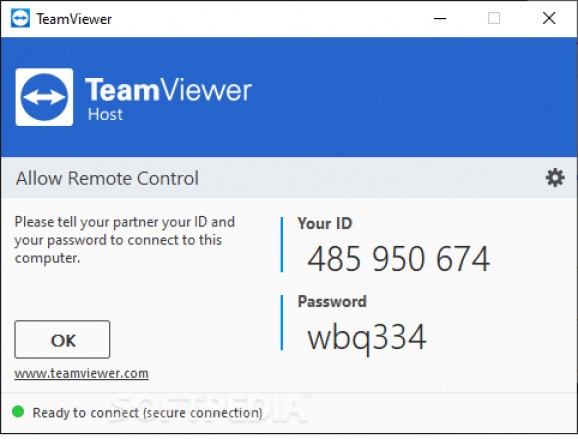
- Unlike the temporary session IDs and passwords generated by the full TeamViewer client, TeamViewer Host assigns a permanent ID to the device.
- Users can set a fixed personal password for unattended access, or rely on their TeamViewer account credentials for authentication.
- Cross-Platform Compatibility:
- TeamViewer Host is available for various operating systems, including Windows, macOS, and Linux, ensuring broad compatibility for different remote environments.
- File Transfer:
- Facilitates secure file and folder transfers between the local (connecting) computer and the remote (Host) machine. This is crucial for sending updates, retrieving logs, or exchanging documents.
- Remote Reboot:
- Allows the connecting user to remotely reboot the Host computer, even into safe mode, which is essential for troubleshooting and maintenance tasks.
- Wake-on-LAN:
- If properly configured on the network, TeamViewer Host can be used to wake up a remote computer from sleep or hibernation, ensuring access even when the machine is powered down.
- Management Console Integration:
- When used with a TeamViewer license, Host devices can be added to the TeamViewer Management Console. This provides centralized management, monitoring, and reporting for all connected Host devices.
- Security Features:
- All connections are secured with AES 256-bit encryption.
- Supports two-factor authentication (2FA) for enhanced account security.
- Allows for whitelisting/blacklisting of TeamViewer IDs to control who can connect.
Pros
- Reliable Unattended Access: Its primary strength is providing consistent and reliable remote access without requiring human intervention on the remote end.
- Easy Deployment: Simple to install and configure, even for users with limited technical expertise.
- Essential for IT Support: A fundamental tool for IT professionals and managed service providers (MSPs) who need to provide proactive or on-demand support to client machines and servers.
- Cross-Platform: Works seamlessly across major desktop operating systems.
- Integration with Management Console: For licensed users, it integrates well with the web-based management console for centralized control and reporting.
- Low Resource Usage (when idle): Designed to run quietly in the background without significantly impacting system performance when not actively in use.
Cons
- No Outgoing Connections: TeamViewer Host cannot initiate outgoing remote connections. Its sole purpose is to receive incoming connections. If you need to connect from the Host machine to another device, you would need the full TeamViewer client installed.
- Commercial Use Detection: Similar to the full TeamViewer client’s free version, if TeamViewer detects commercial use of the Host, it may impose time limits or block connections, requiring a paid license.
- Requires Installation: Unlike the quick-support module of the full TeamViewer client, the Host application needs to be permanently installed on the remote machine.
- Dependency on TeamViewer Ecosystem: Its functionality is tied exclusively to the TeamViewer platform.
Conclusion
TeamViewer Host is an indispensable component for anyone requiring persistent, unattended remote access to computers. It excels in its core function, providing a stable, secure, and easy-to-manage solution for remote support, administration, and personal access. While it is a specialized tool that cannot initiate outgoing connections, its reliability and seamless integration into the broader TeamViewer ecosystem make it a top choice for ensuring that critical remote machines are always within reach. For businesses and IT professionals, it’s a foundational element for efficient remote operations.